Fancy that Project Style calendars (GANTT Charts) but don't have a project
management software?
If you have Microsoft Excel, you can now generate
Project style calendar plans (GANTT Charts), just by entering the
tasks and associated data like it's name and the starting and
end date. Use different colors and select a deadline
terminator for each task. Indent each task to its level or
sub-level.
Now with the REBRANDING option!
Supply
your clients or staff with your own REBRANDED version of our calendar software!!!
-
Click for Details
Based only in EXCEL - No
installation or setup required. Just open in Excel and run! Excel
2007/2010 - Extra
Features for latest versions while remaining fully compatible with the
previous
versions.
Really EASY to use - If you know Excel, you know this!
Really easy to use, just fill in the values in the Input
Cells (or import them from Outlook) and press the "Run" button to create several
different styles of Calendar Plans.
The system will generate a new workbook with the
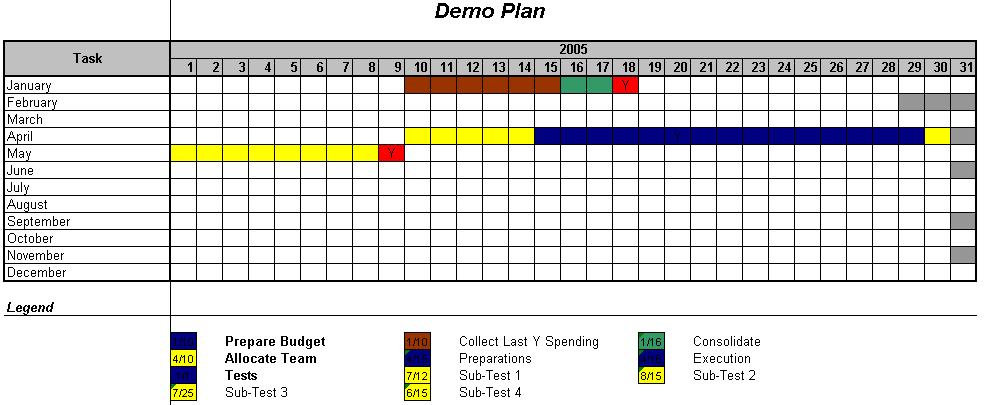
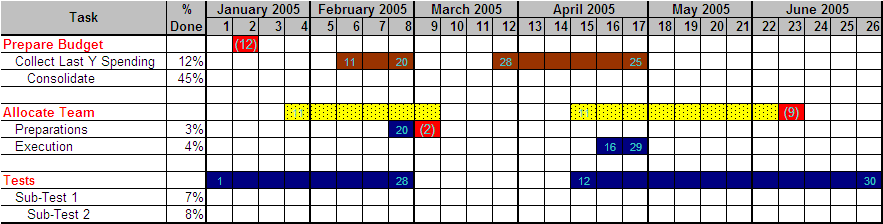
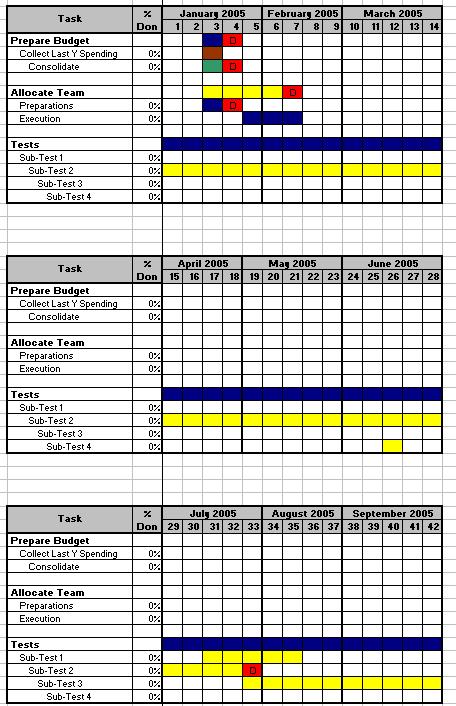
resulting Calendar (PICs. 1, 2, 3 and 4). This new workbook HAS NO MACROS on it,
just the resulting calendar. Change, save and email it as any
other regular Microsoft Excel file.
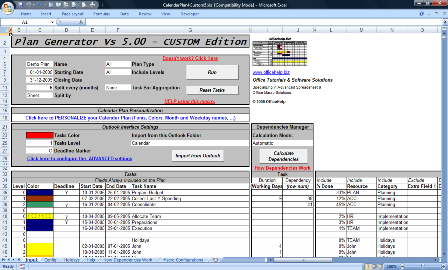
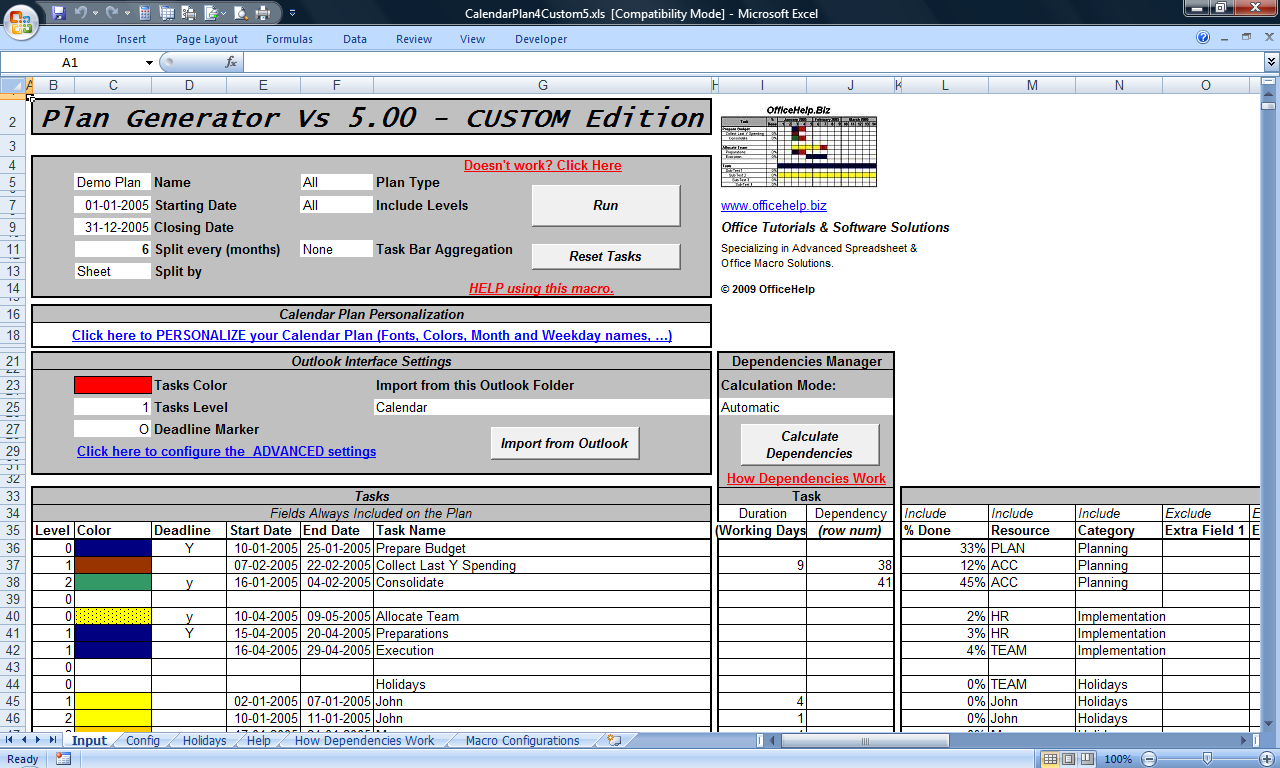
PIC. 5 - Screen Shot from the Microsoft Excel Macro File (Click to Enlarge)
FOUR types of calendar plan from the SAME task list
Generate daily, weekly, monthly, yearly
or
ALL (make them all at once)
calendar plans from the same task list and parameters
(Click Pictures to Enlarge):

PIC. 1 - Daily Calendar Plans have a column for
each day in the calendar.
Better for smaller periods,
when details are important;
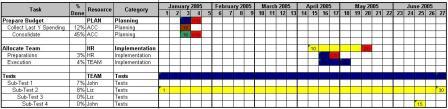
PIC. 2 - Weekly Calendar Plans have
a column for each week in the calendar.
Better for larger periods, when the "big picture" is
important.
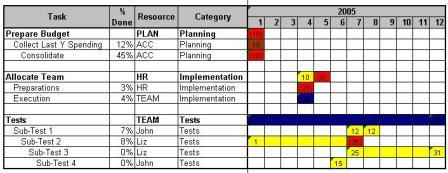
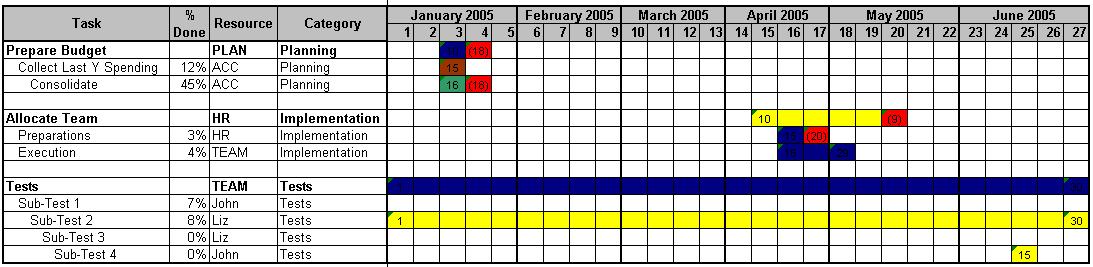
PIC. 3 - Monthly Calendar Plans have
a column for each month in the calendar.
Better for larger periods (1 year and above).
Very good for 1 year calendar plans with an overview of the
main tasks.
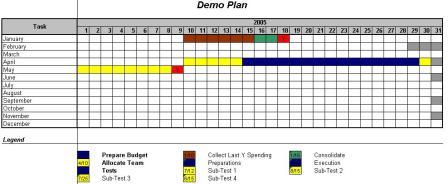
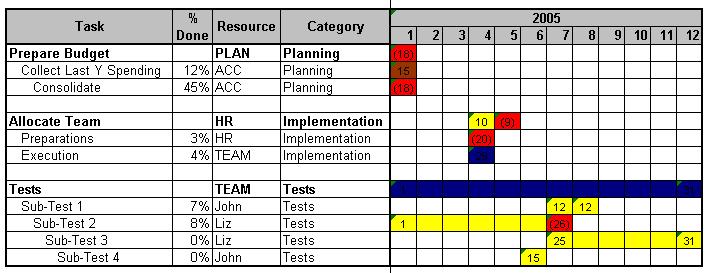
PIC. 4 - Yearly Events Calendars are
a different concept:
There is no
task bars, just a 1 year grid (per year).
Better for important but short
events like meeting and holiday calendars.
ADVANCED features for customization,
regional localization & Outlook integration (click title for
details):
-
DEPENDENCIES
MANAGEMENT
- Project management ready with automatic calculation of task dependencies - as you type! Dependent
tasks automatically adjust to changes on the master tasks. Task durations
may be defined in Days or Working Days. (Click
for Details)
-
MULTIPLE-PERIOD
TASKBARS that can now cover Multiple, Non-Consecutive
periods, as required by many real-world tasks, like meetings,
holidays and several other common project tasks. Create smaller
and easier to read Charts and Calendars! (Click
for Details)
-
FULLY CUSTOMIZE
the look of your calendars by
defining sample cells for
each plan area: headers, task bars, backgrounds and columns
widths. Set the plan to your look instead of manually
formatting the output each time a plan is generated! (Click
for Details)
-
LOCALIZE
the calendar to fit your regional location. Define the Weekend
days. Define Holidays. Have them automatically discounted
as work days on your task calculations and clearly format
them as non-working days on our outputs! (Click
for Details)
-
OUTLOOK Integration:
Import
tasks or calendar events
from Outlook with a highly customizable setup! (Click
for Details)
-
BETTER PLANS
WITH LESS EFFORT with Optional
Fields to easily add or remove heading columns,
Improved Readability by including start and end dates
directly on each task bar (Weekly and Monthly plans) and Detail Management
- include or exclude task levels from plans to differentiate
long-term (Monthly, Yearly) to short-term (Daily., Weekly) plans
without having to write separated task lists! (Click
for Details)
-
REBRANDING: Supply
your clients or staff with your own
REBRANDED version of our calendar software.
Replace our COPYRIGHT messages with YOUR OWN, with NO CODING (Click
for Details)
Dependencies Management - NEW for version 5.00
Easily manage task Dependencies
and Durations. If one tasks changes (delay, etc) the dependent
tasks AUTOMATICALLY adjust. Automatically calculate End
Dates by defining task duration in Days or Working
Days (discounting Weekends and Holidays).

PIC. 6 - Task Dependencies (Click to Enlarge)
Project management ready! To create a dependent task, just
enter the row number for the "Master" task (the one on
which the task is dependent).
* Holidays need to be inserted on the Holidays tab.
There is an automatic holiday generator that currently supports the USA.
Corporate
IT? Consultant? Software Developer? Supply
your clients or staff with your own REBRANDED version of our calendar software!!!
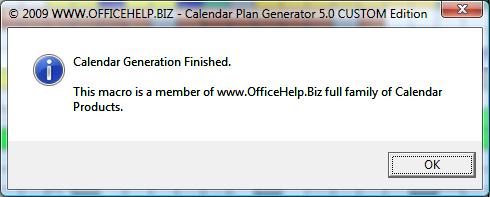
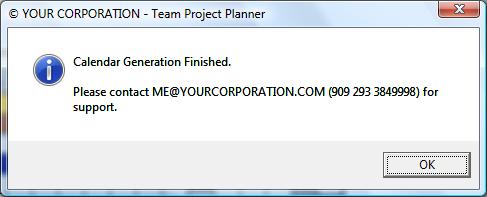
NO CODING required, just change the messages on the
CONFIG Sheet and save them:
FROM:
TO:
WARNING: This is not a Source Code
Edition. Access to source code is not possible, If you are
interested on Source Code, please check the
Source Code
Edition.
What do I get after purchase?
After payment at PayPal,
you will get to a confirmation page with a link to download a ZIP
file containing the macro Microsoft Excel file (CalendarPlan4Custom5.xls).
Click on this link and
save the file to your own hard drive. You will need to unzip it
(extract the Microsoft Excel files from the compressed ZIP file).
Once
extracted from the ZIP file, just open them with Microsoft Excel every
time you want to use it. The DEMO version of other products can be also included for evaluation purposes.
There is a README.TXT tet file on the ZIP with a full description of
its contents.
Based only in EXCEL - No
installation or setup required. Just open in Excel and run!
Try our FREE DEMO
Download and try our FREE DEMO. It works exactly as they Full
Version except for these restrictions:
- Only the first 7 tasks are used, the remaining are ignored;
- The calendar will stop at 27 days after the start date, even
with later finish dates;
- Changing Copyright messages will not work on the DEMO
Download your FREE
DEMO here!
Don't wait any more! Create
YOUR OWN version of the Calendar Plan Generator.
Licence Terms
You have full rights to modify our Copyright message, shown after
each calendar plan generation, using (and only) the interface
provided for it on the CONFIG Sheet of the
Calendar Plan Generator CUSTOM Edition. You may distribute the
changed version to any existing or future
external or internal client by personal relationship.
You are strictly forbidden to
redistribute, sell or made any version (modified or original)
available to the general
public, use it to advertise or attract new clients and to make it
available on the Internet of any form and under any protocol.
Macro can only be supplied to third parties under commercial
relationships involving personal contacts. Distribution to internal
clients within a corporation is allowed.
Multiple Period Taskbars - NEW for version 5.00
Create Smaller,
Pretier and Easier to Read
Charts and Calendars! Taskbars can now cover Multiple,
Non-Consecutive periods, as
required by many real-world tasks, like meetings, holidays and
several other common project tasks.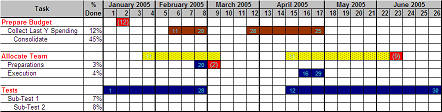
PIC. 7 - Multiple-Period taskbars (Click to Enlarge)
Very simple to implement.
Define each task/period on its own on the task list (as if they were
separated tasks) and activate the Task Bar Aggregation
options near the Run button. There are two aggregation
options:
- Consecutive - aggregates on the same task bar all
consecutive (on the task list) tasks with the same label;
- Global - aggregates on the same task bar all tasks with
the same label on the task list, regardless of their list
position;
No need for multiple bars to display the many
non-consecutive tasks on your project / calendar.
Create SMALLER and EASIER TO READ Charts and
Calendars. Ideal for holidays, meetings,
etc.
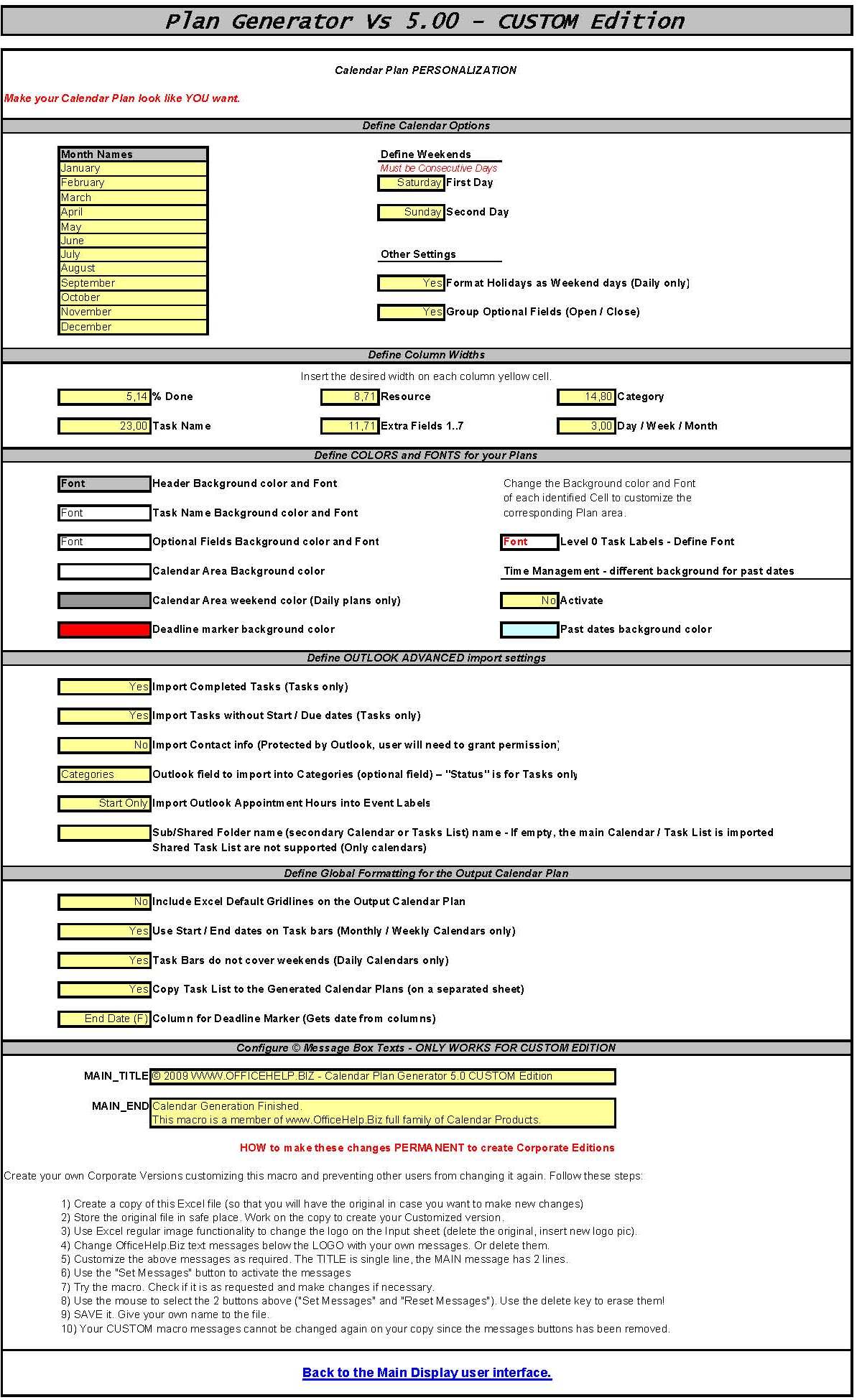
FULLY CUSTOMIZABLE - Make them look the way YOU wantThere are now 4 customization categories and you can customize
all aesthetical features of the plan just by supplying
samples of YOUR intended format. To supply them samples,
just format (using Excel regular tools) the source cell!
- Month Names are supplied as full names in
English. You can use short names, numbers or a different
language;
- Header Column Widths (like the task names
column!) can now be defined in advance so that you don't have to
adjust each calendar output later;
- Background Colors and Fonts for all Plan Cells
- Format the Font and Background Color of the sample cell
for Headings, Task Names,
Optional Fields, Calendar Area,
Weekend Days and Deadline Markers.
The macro will copy their format to all related plan cells!
- Global Formatting options like the use of
Gridlines on the Output Calendar Plan or the
insertion of the beginning and end dates on task bars
(Weekly and Monthly Plans only);
- Define Weekend days - world weekends vary. The
predefined Saturday & Sunday can be switched by
any combination of 2 consecutive week days;
- Format holidays like weekend days - defined
holidays are shown with the same formats (colors,
backgrounds, etc) as weekend days;
- Format Fonts used in taskbars - define
colors, font type, etc for the numbers included on
Weekly and Monthly taskbars;
|
|
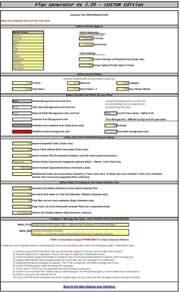 PIC.
8 - Screen Shot from the Customization Sheet
(Click to Enlarge) |
BETTER CALENDAR
PLANS WITH LESS EFFORT
Optional Fields
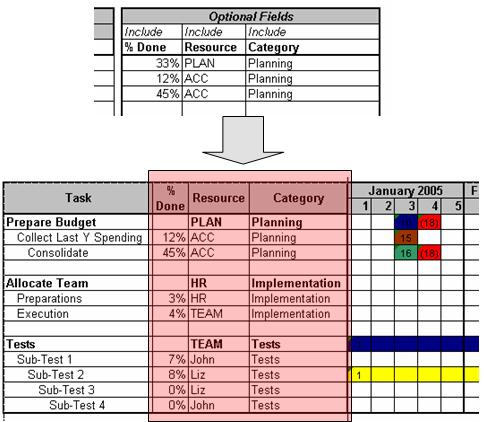
You can include/exclude up to 10 optional fields that are
added as columns between the Task Names and the
Calendar Plan (PIC. 9). They are defined by default as % Done,
Resource and Category, but can be
used for any other purpose. Just change their name!
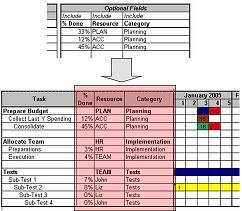
PIC. 9 - Optional Fields in Plan (Click to Enlarge)
Optional Fields can be defined as Excel column
groups (On by default) and Opened / Closed for easier reading & prints.
Detail Management
Plans don't all need the same amount of detail (or sub-tasks).
Long-term plans like monthly plans may include only the main tasks
(Level 0 or Level 0 and 1) but Short-Term plans like Daily or Weekly
may include all sub-tasks (PIC 10). Selection is made on the
Include Levels option field near the Run button.
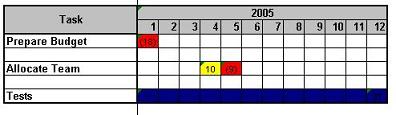
PIC. 10 - Detail Management - Level 0 Tasks only on
Monthly Plan
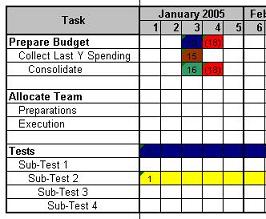
PIC. 11 - Detail Management - All Levels on Weekly
Plan
Improved Readability
Each Task Start and End dates can now be included on the Plan
types where they were not immediately visible on the Plan itself
(Weekly and Monthly):
PIC. 12 - Start and End dates on Task Bars (Click
to Enlarge)
Automatically split long calendars
Force calendar plans to be automatically split
every N (3, 6, ...) months to produce readable and easy to print
plans. Create each split plan on the same sheet or on different
workbooks at choice. No additional effort, just make
your choices and press run!
Full year daily calendars without splitting are
possible in Excel 2007 & 2010, with more than 256 columns
available! Automatically detects of the latest
versions while remaining fully compatible with the all Excel
versions since Excel 97.

PIC. 13 - Non-split Calendar (Click to Enlarge)
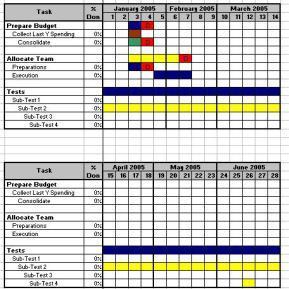
PIC. 14 - Split Calendar (Click to Enlarge)
- Improved Time Management:
- Visual differentiation of past and future
time: apply background color to past dates;
- Add the full Task List (including Optional Fields)
as a second sheet on the GANTT Chart / Calendar
for easier reference.
OUTLOOK
INTEGRATION
Most Excel users are also Microsoft Outlook users
and already have events like Meetings, Holidays and other
tasks on Outlook So why write them again for a Calendar Plan?
Import Tasks or Calendar Events from Microsoft
Outlook
Importing from Outlook is as easy as defining the
desired source (Outlook Calendar or Task list) and Color,
Deadline Marker and Task Level for the
imported tasks. Press the Import from Outlook button and
select the first row for the imported tasks (no overwriting of
manually entered tasks). Relax and see your tasks being
automatically added for you!
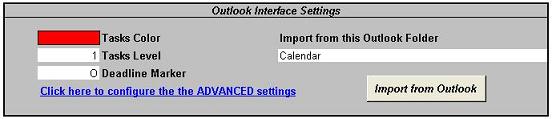
PIC. 15 - Import from Outlook interface
You may import your main or sub Calendars or Task list and even
SHARED CALENDARS just by entering its name on the Advanced
settings! Advanced settings are available on the CONFIG sheet. Check the Help
Information for details.
Easily Print Outlook Calendars or Task lists
- Just import them, apply custom formats, create the calendar and
print it.
OTHER FEATURES
Is Help available?
Yes. There are two sheets on the Microsoft Excel Workbook
(PIC. 16).
The first one is the Input sheet, the second is the Help one. There
is also an Online
Help Page for this product (see bottom of page for all related
links).
PIC. 16 - Input and Help Sheets
Can the resulting Calendar Plans be customized?
Yes, before and after generation. The month names, supplied in
English, can be changed to match any other language. The task bars
on the calendar can have selected colors and optional deadline
terminator.
After generation, the file can be manually changed as any
other regular Microsoft Excel file. There are no special features to the
Calendar file, it is a regular Excel file with painted cells.
Can I save the Plan Generator with the Plan Data? Can I have several copies?
It's a regular Microsoft Excel file. There are NO MACROS on the
resulting plan, only on the generator file. It can be freely copied and manipulated.
Corporate
IT? Consultant? Software Developer? Supply
your clients or staff with your own REBRANDED version of our calendar software!!!
NO CODING required, just change the messages on the
CONFIG Sheet and save them:
FROM:
TO:
WARNING: This is not a Source Code
Edition. Access to source code is not possible, If you are
interested on Source Code, please check the
Source Code
Edition.
What do I get after purchase?
After payment at PayPal,
you will get to a confirmation page with a link to download a ZIP
file containing the macro Microsoft Excel file (CalendarPlan4Custom5.xls).
Click on this link and
save the file to your own hard drive. You will need to unzip it
(extract the Microsoft Excel files from the compressed ZIP file). Once
extracted from the ZIP file, just open them with Microsoft Excel every
time you want to use it. The DEMO version of other products can be also included for evaluation purposes.
There is a README.TXT tet file on the ZIP with a full description of
its contents.
Based only in EXCEL - No
installation or setup required. Just open in Excel and run!
Try our FREE DEMO
Download and try our FREE DEMO. It works exactly as they Full
Version except for these restrictions:
- Only the first 7 tasks are used, the remaining are ignored;
- The calendar will stop at 27 days after the start date, even
with later finish dates;
- Changing Copyright messages will not work on the DEMO
Download your FREE
DEMO here!
Don't wait any more! Create
YOUR OWN version of the Calendar Plan Generator.
Licence Terms
You have full rights to modify our Copyright message, shown after
each calendar plan generation, using (and only) the interface
provided for it on the CONFIG Sheet of the
Calendar Plan Generator CUSTOM Edition. You may distribute the
changed version to any existing or future
external or internal client by personal relationship.
You are strictly forbidden to
redistribute, sell or made any version (modified or original)
available to the general
public, use it to advertise or attract new clients and to make it
available on the Internet of any form and under any protocol.
Macro can only be supplied to third parties under commercial
relationships involving personal contacts. Distribution to internal
clients within a corporation is allowed.
Need more CALENDAR OPTIONS?
Consultant? Developer? Corporate IT? Make your own
BRANDED version!!!
Rebrand messages and interface with YOUR logos and
trademarks! Add missing features or adjust existing ones to
your clients special needs. Supply it as your
own product:
-
CUSTOM Edition (this page product) - No coding,
just enter YOUR own messages to replace our own
branded messages and learn how to replace the logo, lock
your changes (make them permanent) and distribute
YOUR own BRANDED version of our macro! No
coding! Check the licensing terms.
|
- Source Code Edition -
Full access to the Macro source code.Add missing features or adjust existing ones to
your clients special needs. Supply it as your
own product. If
you know Excel VBA you should have no problems understanding this
macro. Check the licensing terms.
|
Excel / Office Consulting Services
Like this product but need a specialized version? Prefer to have the changes professionally applied? Need a completely different Excel product for your own purpose?
Contact us here with your request and we will issue a quick estimate.
Estimates are free and do not constitute any obligation to purchase the service.
Services also available for other Microsoft Office applications like Outlook, Word, Powerpoint,etc.
|