OfficeHelp - Office Tutorials & Software Solutions
Search:
 
Advanced Search

 
Get FREE PC TIPS every month:

More Information Here

Recent AdditionsRecent Additions
Most Popular

What's available for:
Calendars
Privacy & Security
Microsoft® Excel®
Microsoft® Outlook®
Microsoft® Word
Microsoft® PowerPoint®
Microsoft® Internet Explorer®
Others


Calendar Templates 2010/2011 with Holidays (USA / UK / Australia / Canada) for Excel

Yearly, Monthly and Weekly Calendar templates (2 each) for Microsoft® Excel®. Includes versions with Holidays for the USA, UK, Australia and Canada.


Other Contents
Make stylish Planner Calendars - CUSTOM Version
Create your own Budget files without writing a single formula
Easily make your own home and office calendars for Microsoft® Excel®!
Additional Functions & 1 Click Buttons for Excel®
All CALENDARS at once!
Calendar Templates 2007 with Holidays for Excel
Make stylish Planner Calendars - ADVANCED Version
All TEMPLATES at once!
PC TIPS in a single PDF file!
Calendar Templates 2005 / 2010 - Yearly, Monthly, Weekly, Daily and Yearlong Events Calendar Templates
Make stylish Planner Calendars
Make stylish Planner Calendars - BASIC Version
Calendar Plan - Month Planner Template
Calendar Plan - Year Planner Template
Corporate Template for Microsoft® Word
How long the wait?

How to Buy
Write for Us
How safe it is to buy
Privacy Policy

RSS Feed


Home Calendars Bundles Macros PC Tips Templates Newsletter Contact Us
Specializing in Advanced Spreadsheet & Office Macro Solutions.

Content Type Application Author Price
Macro Microsoft® Internet Explorer® OfficeHelp Free


Office / Home /HotSpot Internet Configuration Switch - Version 1.00

Tested on Microsoft® Internet Explorer® Versions: 6.0 - should work on any version above Office 97


Easily switch IE (Internet Explorer) connection settings between Corporate and Home / Public Hotspot (wireless) network settings


Have a corporate Laptop? Can't use IE (Internet Explorer) at home or on public wireless HotSpots? 

Corporate networks have extra security levels and don’t let their users to directly connect to the Internet. An intermediate server, also known as a Proxy, is usually necessary. But it is only available at the Office, so it will prevent Internet connection from home or a public wireless hotspot.

Most times, IE (Internet Explorer) is configured to automatically detect the network it is connected to and to adjust. If this is the case, you should have no problems using different networks. But many other times the proxy has to be manually configured. In this case, the browser will look for it when trying to connect, regardless of which network you're connected to. And, if you're not in office, it won't find it. Because it only exists in the corporate network. Internet access on public and ISP networks is direct, it doesn't use a proxy (much less the one from your office!).

Of course, you can manually change the browser connection settings manually, on and off. All you have to do is:

  1. Select Internet Options from the Tools Menu;
  2. Select the Connections tab;
  3. Open the LAN Settings button;
  4. Swap the Proxy state checkbox ON/OFF

Don't worry about the proxy settings when turning it off. The browser will deactivate it but will remember them later, when you turn it on again. But, if you're unsure, just write it on a paper for backup in case you need to manually restore it.

The easy way to change it

Really easy to use, just open the Excel file with the macro and press the "Run" button to swap the network state:
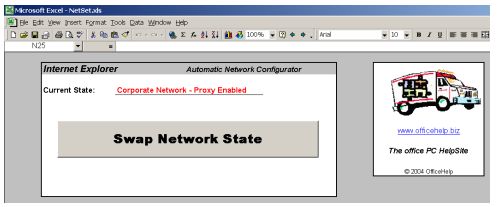
Network Configurator Screen Shot

PIC. 1 - Screen Shot from the Network Configurator

The RED sentence on the picture is the current state. It will update itself when the file is open, to reflect the latest configuration, and will change every time you press the SWAP button. So you always know what network setting is active.


Try it. It's FREE to Download

Click the link below to download the FREE Excel macro:

Download your FREE DEMO here! 

Why do I get a Macro security warning when opening the Plan Generator ? 

There are no security risks associated with this Macro! However, a generic warning message will be displayed on most systems, or Macros may be disabled. For a general overview of Macro security issues, read this article.

Macros are a very useful tool to automate tasks in Office. Unfortunately, like another programming language, it can be misused. There are office Macro Virus, so office can be configured to request permission to run macros. Only run macros from known sources. OfficeHelp macros are Virus Free and can be open with confidence. Office XP/2003 Warning: Macros may need to be activated. Follow instructions on the message Excel XP/2003 will show, if necessary. Read this article for additional information.

Help - The button doesn't work but there are no warnings 

If you can open the Excel file (both the DEMO and/or the commercial version) and get no warnings but the button just won't work, you have Macro support disabled on Excel. Please refer (click here) to our article on Macro security issues for information on how to configure Microsoft Office Macro security settings.


Get FREE PC TIPS every month:


Office / Home /HotSpot Internet Configuration Switch - Version 1.00

Tested on Microsoft® Internet Explorer® Versions: 6.0 - should work on any version above Office 97


Back
Other Contents  

00047- Calendar Templates 2010/2011 with Holidays (USA / UK / Australia / Canada) for Excel Microsoft® Excel® Templates
Yearly, Monthly and Weekly Calendar templates (2 each) for Microsoft® Excel®. Includes versions with Holidays for the USA, UK, Australia and Canada.
 
00044- Custom GANTT Charts for Microsoft® Excel® Microsoft® Excel® Macro
Generate CUSTOM Project style calendar plans with the EXCLUSIVE option to customize our COPYRIGHT messages to create YOUR own REBRANDED Edition. Includes all ADVANCED Edition features plus the REBRANDING option. Distribute CORPORATE versions to your staff.
 
00048- BudGex - Budget Generator for Microsoft® Excel® Microsoft® Excel® Macro
Create your own adjustable Budgets and Profit statements for Microsoft® Excel® at the click of a button. All formulas are automatically generated. Automatic Total and Sub-Total Columns per Period (Quarter, Semester, Year) and Category (Operational Income, Fixed Costs, Operational Costs). Fully Customizable look. Ideal for Small Business, Personal and Department level use.
 
00037- Traditional Calendars for Excel Microsoft® Excel® Macro
Easily generate annual and monthly Traditional & Planning calendars you can print and distribute, based only in Microsoft® Excel®. Five different formats available. Use special colors for special days or events, like holidays or meetings. Automatic event legend. Configurable background and font colors. Optional calendar background image. Traditional, Academic and Fiscal years. Imports data from Microsoft ® Outlook®.
 
00049- ExMiniTools - Utilities Toolbar for Microsoft® Excel® Microsoft® Excel® Macro
Additional Functions & 1 Click Buttons for Excel® with AUTOMATIC SORTING (data changed? just recalculate to sort), EXACT COPY/PASTE (no formula changes), COMPARE FORMULAS in 2 ranges, COUNT UNIQUE values in ranges, RANK numbers in a range (is it the 1st or 4th?), RESTORE ADDIN FUNCTIONS (automatically remove file path from functions), apply ALTERNATE BACKGROUNDS (Row/Column) for easier table reading, automatically REMOVE #ERRORS and 1 Click access to 9 common features.
 
00027- Get all OfficeHelp.Biz CALENDARS at once! Microsoft® Office® General Bundles
Interested in more than one of our Microsoft® Excel® Calendars? Don't want the hassle of paying per purchase? Want to SAVE TIME AND MONEY?
 
00046- Calendar Templates 2007 with Holidays for Excel Microsoft® Excel® Templates
Yearly, Monthly and Weekly Calendar templates (2 each) for 2007 in Excel. Include USA Holidays.
 
00002- Calendar Plan Generator - ADVANCED Edition Microsoft® Excel® Macro
Generate ADVANCED Project style calendar plans, just by entering the tasks and associated data like its name and the starting and end date. Use different colors and select a deadline terminator for each task. Indent each task to its level or sub-level. Change, save and email the resulting calendar as any other regular Microsoft® Excel® file. Includes ADVANCED features like EXTRA plan types, detail filtering, optional fields, extra information of task bars, full customization and Microsoft® Outlook® integration.
 
00040- Get all OfficeHelp.Biz TEMPLATES at once! Microsoft® Office® General Bundles
Interested in more than one of our Templates, including all Excel Calendar Templates? Don't want the hassle of paying per purchase? Want to SAVE TIME AND MONEY?
 
00041- Download our PC TIPS in a single PDF file! Microsoft® Office® General Bundles
Interested in our PC Tips? Don't want the hassle of opening / printing one by one? Want to store it locally on your PC disk? Want to SAVE TIME?
 
00031- Calendar Templates 2005 / 2010 - Yearly, Monthly, Weekly, Daily and Yearlong Events Calendar Templates Microsoft® Excel® Templates
The easiest way to create Excel calendars! Check the samples, copy the pre-formatted Excel calendar sheets and insert YOUR own events! Select from 5 different types of calendar: Yearly, Monthly, Weekly, Daily and Yearlong Events. No code, macros, formulas or other complicated stuff! Just fill in YOUR details.
 
00036- Calendar Plan Generator - Source Code Edition Microsoft® Excel® Macro
Generate Project style calendar plans (weekly only), just by entering the tasks and associated data like it's name and the starting and end date. Use different colors and select a deadline terminator for each task. Indent each task to its level or sub-level. Change, save and email the resulting calendar as any other regular Microsoft® Excel file. SOURCE CODE available for changes for VBA Macro developers.
 
00043- Calendar Plan Generator - BASIC Edition Microsoft® Excel® Macro
Easily generate Project style calendar plans, just by entering the tasks and associated data like it's name and the starting and end date. Use different colors and select a deadline terminator for each task. Indent each task to its level or sub-level. Change, save and email the resulting calendar as any other regular Microsoft® Excel file. The SIMPLEST edition, just ONE button to use!
 
00030- Calendar Plan - Month Planner Template Microsoft® Excel® Templates
Create pretty monthly planning calendars in minutes. Save time and effort. Ready to use calendar template! Really useful to set monthly or multi-month events like meetings, projects, holidays and all other long-term schedules. Regular Excel file, sample included.
 
00028- Calendar Plan - Year Planner Template Microsoft® Excel® Templates
Create pretty yearlong planning calendars in minutes. Save time and effort. Ready to use calendar template! Really useful to set yearlong event like general meetings, special groups, holidays and all other long-term schedules. Regular Excel file, sample included.
 
00008- Corporate Template for Microsoft®Word Microsoft® Word® Templates
Clear and organized template for general documents, especially suitable for longer documents. Includes Table of Contents, highly visible Level 1 titles, arrow bullets and a sample table.
 
00001- Queue Servicing Calculator Microsoft® Excel® Macro
Calculates the average waiting times and people (or item) processing times based on some input estimates. Can be used to make service capacity simulations or to measure the service throughput on any service or process demanding waiting queues.
 

Privacy Policy How to Buy How safe is it to Buy? RSS Feed Write for Us Resources

(c) 2004 - 2010 SiteApps